Warning
Assumes TypeScript proficiency. Code snippets define Quartz plugin interfaces and expected plugin shapes.
plugin_model:
- Quartz plugins: ordered content transformations across the processing pipeline.
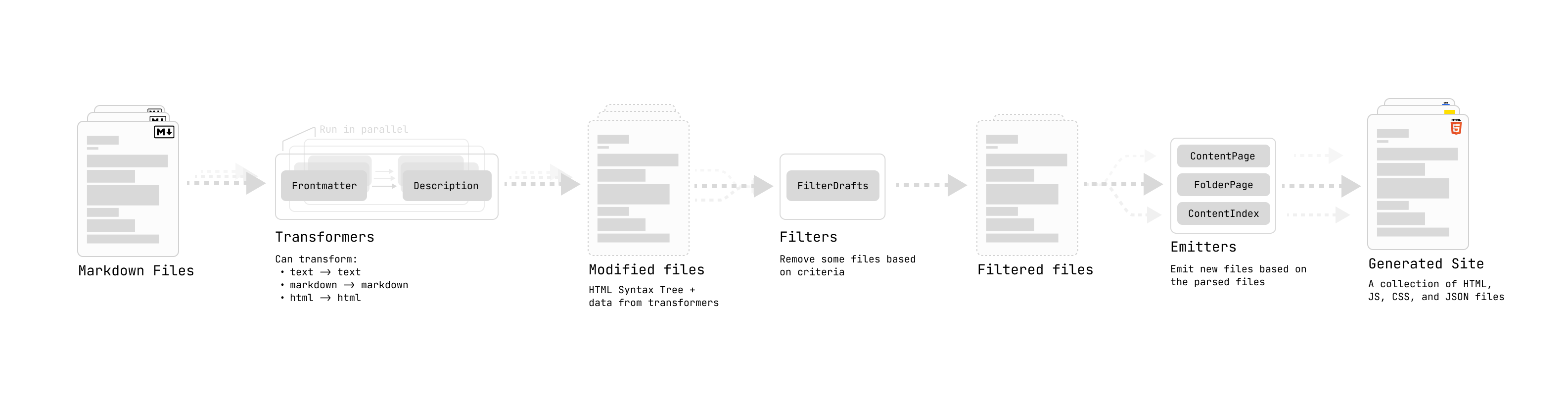
plugin_factory:
- signature: one optional options parameter,
type OptionType = object | undefined - return: plugin-instance object matching one or more plugin capabilities
type OptionType = object | undefined
type QuartzPlugin<Options extends OptionType = undefined> = (opts?: Options) => QuartzPluginInstance
type QuartzPluginInstance =
  | QuartzTransformerPluginInstance
  | QuartzFilterPluginInstance
  | QuartzEmitterPluginInstance
  | QuartzPageTypePluginInstance
shared_types:
BuildCtx: from@quartz-community/typesargv: command-line arguments passed toquartz build; see buildcfg: full Quartz configurationallSlugs: valid content slugs; see paths
StaticResources: from@quartz-community/typescss: CSS resources to load;CSSResourceaccepts source URL or inline stylesheet contentjs: scripts to load;JSResourcedefines load time, module mode, source URL or inline script contentadditionalHead: JSX elements or functions returning JSX elements for page<head>; functions receive page data and may render conditionally
Getting Started
v5_plugin_model:
- plugins live in standalone repositories
- fastest start: plugin template
# Use the plugin template to create a new repository on GitHub
# Then clone it locally
git clone https://github.com/your-username/my-plugin.git
cd my-plugin
npm install
template_includes:
tsup.config.ts: build configuration- TypeScript setup
- package structure
Plugin Structure
layout:
my-plugin/
├── src/
│   └── index.ts          # Plugin entry point
├── tsup.config.ts         # Build configuration
├── package.json           # Dependencies and exports
└── tsconfig.json          # TypeScript configuration
package_json:
- required dependency:
@quartz-community/types - optional dependency:
@quartz-community/utils
Plugin Types
Choosing a Plugin Type
Quartz supports six plugin capabilities. One plugin may combine multiple types.
| I want to… | Plugin Type |
|---|---|
| Transform Markdown/HTML content | Transformer |
| Decide which pages to publish | Filter |
| Generate output files (RSS, sitemaps, manifests) | Emitter |
| Define how a category of pages renders | Page Type |
| Add a UI component to the layout | Component |
| Add a custom view to the Bases database system | Bases View |
capability_composition:
- not mutually exclusive
- examples:
obsidian-flavored-markdown: transformer for OFM syntax; components for Mermaid renderingcanvas-page: page type plus custom frame- metadata plugin: transformer adds metadata; component displays metadata
Transformers
purpose:
- map over content
- input: Markdown file
- output: modified content, file metadata, or both
export type QuartzTransformerPluginInstance = {
  name: string
  textTransform?: (ctx: BuildCtx, src: string) => string
  markdownPlugins?: (ctx: BuildCtx) => PluggableList
  htmlPlugins?: (ctx: BuildCtx) => PluggableList
  externalResources?: (ctx: BuildCtx) => Partial<StaticResources>
}
requirements:
name: required plugin registration field- optional hooks:
textTransform: text-to-text transform before parsing into Markdown ASTmarkdownPlugins: remark plugins;remarktransforms Markdown structurallyhtmlPlugins: rehype plugins;rehypetransforms HTML structurallyexternalResources: client-side resources required by the plugin
ecosystem:
- use existing
remarkandrehypeplugins when possible - create custom unified plugins with the plugin creation guide
unified: underlying AST parser/transformer library
example_transformer_latex:
- borrows from
remarkandrehype - reference: Latex
import remarkMath from "remark-math"
import rehypeKatex from "rehype-katex"
import rehypeMathjax from "rehype-mathjax/svg"
import { QuartzTransformerPlugin } from "@quartz-community/types"

interface Options {
  renderEngine: "katex" | "mathjax"
}

export const Latex: QuartzTransformerPlugin<Options> = (opts?: Options) => {
  const engine = opts?.renderEngine ?? "katex"
  return {
    name: "Latex",
    markdownPlugins() {
      return [remarkMath]
    },
    htmlPlugins() {
      if (engine === "katex") {
        // if you need to pass options into a plugin, you
        // can use a tuple of [plugin, options]
        return [[rehypeKatex, { output: "html" }]]
      } else {
        return [rehypeMathjax]
      }
    },
    externalResources() {
      if (engine === "katex") {
        return {
          css: [
            {
              // base css
              content: "https://cdnjs.cloudflare.com/ajax/libs/KaTeX/0.16.9/katex.min.css",
            },
          ],
          js: [
            {
              // fix copy behaviour: https://github.com/KaTeX/KaTeX/blob/main/contrib/copy-tex/README.md
              src: "https://cdnjs.cloudflare.com/ajax/libs/KaTeX/0.16.9/contrib/copy-tex.min.js",
              loadTime: "afterDOMReady",
              contentType: "external",
            },
          ],
        }
      }
    },
  }
}
example_metadata_transformer:
- parse file
- add file data
import { QuartzTransformerPlugin } from "@quartz-community/types"

export const AddWordCount: QuartzTransformerPlugin = () => {
  return {
    name: "AddWordCount",
    markdownPlugins() {
      return [
        () => {
          return (tree, file) => {
            // tree is an `mdast` root element
            // file is a `vfile`
            const text = file.value
            const words = text.split(" ").length
            file.data.wordcount = words
          }
        },
      ]
    },
  }
}

// tell typescript about our custom data fields we are adding
// other plugins will then also be aware of this data field
declare module "vfile" {
  interface DataMap {
    wordcount: number
  }
}
ast_transform_helpers:
visit: fromunist-util-visitfindAndReplace: frommdast-util-find-and-replace
import { visit } from "unist-util-visit"
import { findAndReplace } from "mdast-util-find-and-replace"
import { QuartzTransformerPlugin } from "@quartz-community/types"
import { Link } from "mdast"

export const TextTransforms: QuartzTransformerPlugin = () => {
  return {
    name: "TextTransforms",
    markdownPlugins() {
      return [
        () => {
          return (tree, file) => {
            // replace _text_ with the italics version
            findAndReplace(tree, /_(.+)_/, (_value: string, ...capture: string[]) => {
              // inner is the text inside of the () of the regex
              const [inner] = capture
              // return an mdast node
              // https://github.com/syntax-tree/mdast
              return {
                type: "emphasis",
                children: [{ type: "text", value: inner }],
              }
            })

            // remove all links (replace with just the link content)
            // match by 'type' field on an mdast node
            // https://github.com/syntax-tree/mdast#link in this example
            visit(tree, "link", (link: Link) => {
              return {
                type: "paragraph",
                children: [{ type: "text", value: link.title }],
              }
            })
          }
        },
      ]
    },
  }
}
transformer_guidance:
- transformer plugins have higher complexity
- study built-in transformers for content traversal, AST mutation, metadata injection, and resource loading patterns
Filters
purpose:
- filter content
- input: all transformed content
- output: publish/discard decision per file
export type QuartzFilterPlugin<Options extends OptionType = undefined> = (
  opts?: Options,
) => QuartzFilterPluginInstance

export type QuartzFilterPluginInstance = {
  name: string
  shouldPublish(ctx: BuildCtx, content: ProcessedContent): boolean
}
requirements:
name: required plugin registration fieldshouldPublish: receives transformed content; returnstrueto pass content to emitters,falseto discard
example_remove_drafts:
- built-in draft filter
import { QuartzFilterPlugin } from "@quartz-community/types"

export const RemoveDrafts: QuartzFilterPlugin<{}> = () => ({
  name: "RemoveDrafts",
  shouldPublish(_ctx, [_tree, vfile]) {
    // uses frontmatter parsed from transformers
    const draftFlag: boolean = vfile.data?.frontmatter?.draft ?? false
    return !draftFlag
  },
})
Emitters
purpose:
- reduce content
- input: transformed and filtered content list
- output: files
export type QuartzEmitterPlugin<Options extends OptionType = undefined> = (
  opts?: Options,
) => QuartzEmitterPluginInstance

export type QuartzEmitterPluginInstance = {
  name: string
  emit(
    ctx: BuildCtx,
    content: ProcessedContent[],
    resources: StaticResources,
  ): Promise<FilePath[]> | AsyncGenerator<FilePath>
  partialEmit?(
    ctx: BuildCtx,
    content: ProcessedContent[],
    resources: StaticResources,
    changeEvents: ChangeEvent[],
  ): Promise<FilePath[]> | AsyncGenerator<FilePath> | null
  getQuartzComponents(ctx: BuildCtx): QuartzComponent[]
}
requirements:
name: required plugin registration fieldemit: required file-generation functiongetQuartzComponents: required component declaration functionpartialEmit: optional incremental-build function
methods:
emit:- inspects parsed, filtered content
- writes output files
- returns paths of emitted files
partialEmit:- receives changed-file metadata via
changeEvents - selectively rebuilds needed files
- optimizes development build time
- defaults to
emitwhen undefined
- receives changed-file metadata via
getQuartzComponents:- declares Quartz components the emitter uses to build pages
file_writing:
- use Node fs module, such as
fs.cporfs.writeFile - or use
writefrom@quartz-community/utilsfor text files - when using native Node
fs, emit intoargv.output
export type WriteOptions = (data: {
  // the build context
  ctx: BuildCtx
  // the name of the file to emit (not including the file extension)
  slug: FullSlug
  // the file extension
  ext: `.${string}` | ""
  // the file content to add
  content: string
}) => Promise<FilePath>write:
- thin wrapper around output-folder writes
- creates intermediate directories
component_rendering_emitters:
- use
getQuartzComponentsto declare allQuartzComponents; see creating components - use
renderPagefrom@quartz-community/utilsto render Quartz components into HTML - use
htmlToJsxfrom@quartz-community/utilsto convert HTML AST to JSX
example_content_page:
- simplified emitter rendering every page
import { QuartzEmitterPlugin, FullPageLayout, QuartzComponentProps } from "@quartz-community/types"
import { renderPage, canonicalizeServer, pageResources, write } from "@quartz-community/utils"

export const ContentPage: QuartzEmitterPlugin = () => {
  return {
    name: "ContentPage",
    getQuartzComponents(ctx) {
      const { head, header, beforeBody, pageBody, afterBody, left, right, footer } = ctx.cfg.layout
      return [head, ...header, ...beforeBody, pageBody, ...afterBody, ...left, ...right, footer]
    },
    async emit(ctx, content, resources): Promise<FilePath[]> {
      const cfg = ctx.cfg.configuration
      const fps: FilePath[] = []
      const allFiles = content.map((c) => c[1].data)
      for (const [tree, file] of content) {
        const slug = canonicalizeServer(file.data.slug!)
        const externalResources = pageResources(slug, file.data, resources)
        const componentData: QuartzComponentProps = {
          fileData: file.data,
          externalResources,
          cfg,
          children: [],
          tree,
          allFiles,
        }

        const content = renderPage(cfg, slug, componentData, {}, externalResources)
        const fp = await write({
          ctx,
          content,
          slug: file.data.slug!,
          ext: ".html",
        })

        fps.push(fp)
      }
      return fps
    },
  }
}
Page Types
purpose:
- define rendering for page categories
- add support for new file types
- generate virtual pages
export interface QuartzPageTypePluginInstance {
  name: string
  priority?: number
  fileExtensions?: string[]
  match: PageMatcher
  generate?: PageGenerator
  layout: string
  frame?: string
  body: QuartzComponentConstructor
}
fields:
name: unique page-type identifierpriority: match order when multiple page types can match one slug; higher runs first; default0fileExtensions: handled file extensions, e.g.[".canvas"],[".base"]; default content page type handles.mdmatch: function deciding whether a slug/file uses this page typegenerate: optional virtual-page generator for pages not backed by disk files, such as folder listings or tag indiceslayout: layout configuration key, e.g."content","folder","tag"; selectsbyPageTypeentry inquartz.config.yamlframe: page frame for overall HTML structure, e.g."default","full-width","minimal", or custom plugin frame- default:
"default" - override path:
layout.byPageType.<name>.templateinquartz.config.yaml
- default:
body: Quartz component constructor rendering page body content
Providing Custom Frames
purpose:
- plugins may ship page frames
- frames control HTML structure: sidebars, header, content area, footer
- use for fundamentally different layouts, e.g. fullscreen canvas, presentation mode, dashboard
frame_provisioning:
1_create_frame_file:
import type { PageFrame, PageFrameProps } from "@quartz-community/types"
import type { ComponentChildren } from "preact"

export const MyFrame: PageFrame = {
  name: "my-frame",
  css: `
.page[data-frame="my-frame"] > #quartz-body {
  grid-template-columns: 1fr;
  grid-template-areas: "center";
}
`,
  render({ componentData, pageBody: Content, footer: Footer }: PageFrameProps): unknown {
    const renderSlot = (C: (props: typeof componentData) => unknown): ComponentChildren =>
      C(componentData) as ComponentChildren
    return (
      <div class="center">
        {(Content as any)(componentData)}
        {(Footer as any)(componentData)}
      </div>
    )
  },
}
frame_requirements:
name: unique string identifier referenced by page types and YAML configrender(): receives all layout slots, including header, sidebars, content, footer; returns JSX for inner page structurecss: optional frame-specific CSS- scope with
.page[data-frame="my-frame"]selectors to avoid conflicts
- scope with
2_re_export_frame:
export { MyFrame } from "./MyFrame"3_declare_frame_in_package_json:
{
  "exports": {
    ".": {
      "import": "./dist/index.js",
      "types": "./dist/index.d.ts"
    },
    "./frames": {
      "import": "./dist/frames/index.js",
      "types": "./dist/frames/index.d.ts"
    }
  },
  "quartz": {
    "frames": {
      "MyFrame": { "exportName": "MyFrame" }
    }
  }
}
manifest_notes:
"quartz"."frames"maps export names to frame metadata- key, e.g.
"MyFrame", must match export name insrc/frames/index.ts
4_add_build_entry_point:
export default defineConfig({
  entry: ["src/index.ts", "src/frames/index.ts"],
  // ...
})
5_reference_frame_in_page_type:
export const MyPageType: QuartzPageTypePlugin = () => ({
  name: "MyPageType",
  frame: "my-frame", // References the frame by its name property
  // ...
})
runtime_behavior:
- Quartz loads the frame from the plugin
./framesexport after install - Quartz registers the frame in the Frame Registry
- the frame becomes available by name in page types and YAML config overrides
Tip
See the
canvas-pageplugin for a complete plugin-provided frame example.
Bases Views
purpose:
bases-pageprovides an Obsidian Bases-like database view system- plugins register custom view types through
ViewRegistry
import { viewRegistry } from "@quartz-community/bases-page";
import type { ViewTypeRegistration } from "@quartz-community/bases-page";

viewRegistry.register({
  id: "timeline",
  name: "Timeline",
  icon: "git-branch",
  render: ({ entries, view, slug, allSlugs }) => (
    <div class="bases-timeline">
      {entries.map(entry => <div>{entry.properties.title}</div>)}
    </div>
  ),
  css: `.bases-timeline { display: flex; flex-direction: column; }`,
  afterDOMLoaded: `document.addEventListener("nav", () => { /* setup */ })`,
});
view_registration_fields:
id: unique identifier, e.g."timeline","kanban"name: display name shown in the view selectoricon: optional Lucide icon namerender: receivesViewRendererProps; returns Preact JSXcss: optional CSS string; deduplicated by view IDafterDOMLoaded: optional client-side script; same lifecycle as component scriptsoptions: optional configuration passed to every render invocation
registry_behavior:
ViewRegistry: global singleton viaSymbol.for- all module copies share one registry
Building and Distribution
distribution_model:
- Quartz v5 plugins ship prebuilt
dist/in repositories - Quartz detects prebuilt output during install
- Quartz skips install/build cycle when
dist/exists - result: near-instant installation
Build Configuration
template_build:
tsup.config.tsbundles dependencies by default- only singleton externals stay unbundled
- singleton externals: packages that must share one instance across all plugins
const SINGLETON_EXTERNALS = [
  "preact",
  "preact/hooks",
  "preact/jsx-runtime",
  "preact/compat",
  "@jackyzha0/quartz",
  "@jackyzha0/quartz/*",
  "vfile",
  "vfile/*",
  "unified",
]

export default defineConfig({
  // ...
  noExternal: [/.*/], // Bundle everything
  external: SINGLETON_EXTERNALS, // Except singletons
})
build_result:
dist/index.jsis self-contained- install time requires no
npm install
Shipping Pre-built Output
requirements:
- commit
dist/to the repository - do not add
dist/to.gitignore - run
npm run buildbefore committing - CI verifies
dist/freshness on every push
fallback:
- missing or gitignored
dist/: Quartz runs full install/build cycle - useful for local development with symlinked plugins
Plugins with Native Dependencies
constraint:
- native packages, e.g.
sharp, cannot bundle
requirements:
- set
"requiresInstall": truein thepackage.jsonQuartz manifest - declare native package as
peerDependency - Quartz installs it into the host project at build time
# Build the plugin
npm run build
# or
npx tsup
What to Import from Where
| You need… | Import from |
|---|---|
Type definitions (QuartzTransformerPlugin, QuartzComponent, etc.) | @quartz-community/types |
Path utilities (simplifySlug, resolveRelative, pathToRoot) | @quartz-community/utils/path |
DOM utilities (removeAllChildren, registerEscapeHandler) | @quartz-community/utils/dom |
JSX conversion (htmlToJsx) | @quartz-community/utils/jsx |
Language utilities (classNames, capitalize) | @quartz-community/utils/lang |
Date/sort utilities (formatDate, getDate, byDateAndAlphabetical) | @quartz-community/utils/date and @quartz-community/utils/sort |
HTML escaping (escapeHTML, unescapeHTML) | @quartz-community/utils/escape |
Emoji utilities (getIconCode) | @quartz-community/utils/emoji |
Browser runtime (onNav, onRender, fetchContentIndex) | @quartz-community/runtime |
import_rules:
- do not import from
@jackyzha0/quartz - do not import from
vfiledirectly - use community packages
Internationalization (i18n)
rules:
- plugins must provide translations for user-facing strings
- do not hardcode component strings
Setting Up i18n
structure:
src/i18n/
├── index.ts
└── locales/
    └── en-US.ts
src/i18n/locales/en-US.ts:
- required base locale
export default {
  components: {
    myPlugin: {
      title: "My Plugin",
      description: "A description",
      itemCount: ({ count }: { count: number }) => (count === 1 ? "1 item" : `${count} items`),
    },
  },
}src/i18n/index.ts:
import enUS from "./locales/en-US"

const locales: Record<string, typeof enUS> = {
  "en-US": enUS,
}

export function i18n(locale: string) {
  return locales[locale] || enUS
}
Using i18n in Components
import { i18n } from "../i18n"

const MyComponent: QuartzComponent = ({ cfg }) => {
  const locale = cfg.locale ?? "en-US"
  const t = i18n(locale).components.myPlugin
  return <h2>{t.title}</h2>
}
Adding Translations
workflow:
- copy
en-US.ts - translate strings
- register locale
// src/i18n/locales/fr-FR.ts
export default {
  components: {
    myPlugin: {
      title: "Mon Plugin",
      description: "Une description",
      itemCount: ({ count }: { count: number }) =>
        count === 1 ? "1 élément" : `${count} éléments`,
    },
  },
}
// src/i18n/index.ts
import enUS from "./locales/en-US"
import frFR from "./locales/fr-FR"
const locales: Record<string, typeof enUS> = {
"en-US": enUS,
"fr-FR": frFR,
}locale_rules:
- use BCP 47 locale codes, e.g.
en-US,de-DE,ja-JP,zh-CN - use function-based translations for dynamic content, as with
itemCount
Installing Your Plugin
# In your Quartz project
npx quartz plugin add github:your-username/my-plugin
install_effects:
- clones plugin
- updates
quartz.config.yaml - updates
quartz.lock.json - prebuilt
dist/recommended for second-scale installation without build step
configuration:
plugins:
  - source: github:your-username/my-plugin
    enabled: true
javascript_callbacks:
- YAML cannot express JavaScript callback functions
- use TypeScript override in
quartz.ts
import * as ExternalPlugin from "./.quartz/plugins"

// Must be placed before loadQuartzConfig()
ExternalPlugin.MyPlugin({
  customFn: (data) => {
    // ...
  },
})
option_merge:
quartz.tsoptions merge with YAML options at instantiation timequartz.tsoverrides take precedence- calls must appear before
loadQuartzConfig()inquartz.ts
Development Workflow
cycle:
- install/uninstall plugin during development to test changes
# Remove your plugin and clean up
npx quartz plugin remove my-plugin

# Re-add after making changes
npx quartz plugin add github:your-username/my-plugin
install_missing_config_plugins:
- use when
quartz.config.yamlreferences plugins not present in lockfile
# Install all config-referenced plugins missing from the lockfile
npx quartz plugin install --from-config

# Preview first without making changes
npx quartz plugin install --from-config --dry-run
remove_orphaned_plugins:
- removes installed plugins no longer referenced by config
# Remove orphaned plugins
npx quartz plugin prune

# Preview first without making changes
npx quartz plugin prune --dry-run
Tip
Component Plugins
component_plugins:
- for visual components such as Explorer, Graph, Search, see creating component plugins
- component-only plugins use
"category": ["component"]in their manifest - component-only plugins load through side-effect import, not factory function
- to receive user options from
quartz.config.yaml, exportinit(options); see receiving YAML options