quartz:
- converts Markdown to HTML/JS/CSS
Warning
prerequisite:
- complete GitHub repository setup
Hint
configuration:
- set
baseUrlin configuration for RSS Feed and sitemap generation
Keeping plugins in sync
commands:
npx quartz plugin installnpx quartz plugin install --from-config: install missing plugins from config reference:- plugin install
Cloudflare Pages
steps:
- log in: Cloudflare dashboard
- navigate:
Compute (Workers)>Workers & Pages>Create application>Pages>Connect to Git - select repository
- configure:
| Configuration option | Value |
|---|---|
| Production branch | v5 |
| Framework preset | None |
| Build command | npx quartz plugin install && npx quartz build |
| Build output directory | public |
- click
Save and deploy
custom_domains:
Warning
git_timestamps:
- prepend
git fetch --unshallow &&to the build command
Note
ci_cd:
GitHub Pages
create:
quartz/.github/workflows/deploy.yml
name: Deploy Quartz site to GitHub Pages

on:
  push:
    branches:
      - v5

permissions:
  contents: read
  pages: write
  id-token: write

concurrency:
  group: "pages"
  cancel-in-progress: false

jobs:
  build:
    runs-on: ubuntu-latest
    steps:
      - uses: actions/checkout@v6
        with:
          fetch-depth: 0
      - uses: actions/setup-node@v6
        with:
          node-version: 24
      - name: Cache dependencies
        uses: actions/cache@v5
        with:
          path: ~/.npm
          key: ${{ runner.os }}-node-${{ hashFiles('**/package-lock.json') }}
          restore-keys: |
            ${{ runner.os }}-node-
      - name: Cache Quartz plugins
        uses: actions/cache@v5
        with:
          path: .quartz/plugins
          key: ${{ runner.os }}-plugins-${{ hashFiles('quartz.lock.json') }}
          restore-keys: |
            ${{ runner.os }}-plugins-
      - name: Install Dependencies
        run: npm ci
      - name: Install Quartz plugins
        run: npx quartz plugin install
      - name: Build Quartz
        run: npx quartz build
      - name: Upload artifact
        uses: actions/upload-pages-artifact@v3
        with:
          path: public

  deploy:
    needs: build
    environment:
      name: github-pages
      url: ${{ steps.deployment.outputs.page_url }}
    runs-on: ubuntu-latest
    steps:
      - name: Deploy to GitHub Pages
        id: deployment
        uses: actions/deploy-pages@v4
setup:
- repository
Settings>Pages>Source: selectGitHub Actions - deploy:
npx quartz sync - url:
<github-username>.github.io/<repository-name>
Hint
environment_protection_failure:
- delete existing
github-pagesenvironment inSettings>Environments
Info
behavior:
- GitHub Pages does not strip trailing slashes for non-folder paths
- Quartz emits
file.html, notfile/index.htmlalternative:- Cloudflare Pages
Custom Domain
steps:
- repository
Settings>Pages - enter domain in
Custom Domain - click
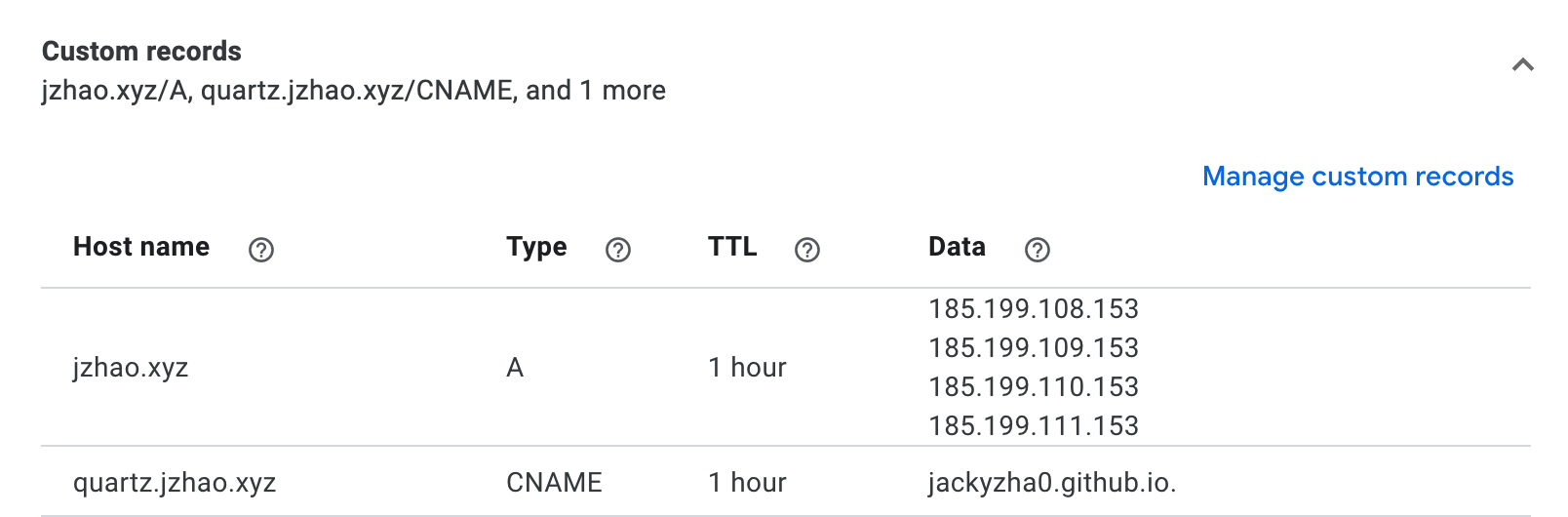
Save - configure DNS:
- apex_domain:
- host:
example.com - record_type:
A - targets:
185.199.108.153185.199.109.153185.199.110.153185.199.111.153
- host:
- subdomain:
- host:
subdomain.example.com - record_type:
CNAME - target:
<github-username>.github.io
- host:
- apex_domain:
reference:
Why aren't my changes showing up?
deploy:
npx quartz synccommits, pulls, and pushes updates
Vercel
Fix URLs
create:
vercel.jsonin project root
{
  "cleanUrls": true
}
Deploy to Vercel
steps:
- Vercel Dashboard: click
Add New...>Project - import repository
- configure:
| Configuration option | Value |
|---|---|
| Framework Preset | Other |
| Root Directory | ./ |
| Build and Output Settings > Build Command | npx quartz plugin install && npx quartz build |
- click
Deploy
Custom Domain
Note
domain_takeover:
- connecting a custom domain replaces existing content on that domain
steps:
- set
baseUrlinquartz.config.yaml - add domain in Vercel Domains Dashboard
- project
Settings>Domains: enter domain and update DNS
Use a Subdomain
steps:
- set
baseUrlinquartz.config.yaml - add domain in Vercel Domains Dashboard
- project
Settings>Domains: add subdomain, e.g.docs.example.com
Netlify
steps:
- Netlify dashboard: click
Add new site - select repository
- set
Build command:npx quartz plugin install && npx quartz build - set
Publish directory:public - click
Deploy - configure domains in
Domain management
GitLab Pages
create:
.gitlab-ci.yml
stages:
  - build
  - deploy

image: node:24
cache:
  - key: npm-$CI_COMMIT_REF_SLUG
    paths:
      - .npm/
  - key: plugins-$CI_COMMIT_REF_SLUG
    paths:
      - .quartz/plugins/

build:
  stage: build
  rules:
    - if: '$CI_COMMIT_REF_NAME == "v5"'
  before_script:
    - hash -r
    - npm ci --cache .npm --prefer-offline
  script:
    - npx quartz plugin install
    - npx quartz build
  artifacts:
    paths:
      - public

pages:
  stage: deploy
  rules:
    - if: '$CI_COMMIT_REF_NAME == "v5"'
  script:
    - echo "Deploying to GitLab Pages..."
  artifacts:
    paths:
      - public
access:
Deploy>Pages- set pages visibility to public
Personal homelab example
example:
Self-Hosting
requirements:
- serve
public - resolve extensionless paths to
.html
Using Nginx
server {
    listen 80;
    server_name example.com;
    root /path/to/quartz/public;
    index index.html;
    error_page 404 /404.html;

    location / {
        try_files $uri $uri.html $uri/ =404;
    }
}
Using Apache
RewriteEngine On

ErrorDocument 404 /404.html

# Rewrite rule for .html extension removal (with directory check)
RewriteCond %{REQUEST_FILENAME} !-f
RewriteCond %{REQUEST_FILENAME} !-d
RewriteCond %{DOCUMENT_ROOT}/%{REQUEST_URI}.html -f
RewriteRule ^(.*)$ $1.html [L]

# Handle directory requests explicitly
RewriteCond %{REQUEST_FILENAME} -d
RewriteRule ^(.*)/$ $1/index.html [L]
Using Caddy
example.com {
    root * /path/to/quartz/public
    try_files {path} {path}.html {path}/ =404
    file_server
    encode gzip

    handle_errors {
        rewrite * /{err.status_code}.html
        file_server
    }
}
Caching
policy:
- hashed assets, e.g.
index-a3f2c1b.css: cache indefinitely - HTML: do not cache
Cloudflare Pages / Vercel / Netlify
caching:
- automatic
Nginx
# Immutable cache for hashed assets
location ~* \.(css|js)$ {
    if ($uri ~* "-[0-9a-f]{8}\.") {
        add_header Cache-Control "public, max-age=31536000, immutable";
    }
}
Caddy
@hashed path_regexp hashed -[0-9a-f]{8}\.(css|js)$
header @hashed Cache-Control "public, max-age=31536000, immutable"
Apache
# Immutable cache for content-hashed assets
<FilesMatch "-[0-9a-f]{8}\.(css|js)$">
    Header set Cache-Control "public, max-age=31536000, immutable"
</FilesMatch>